
New
September 2026 Product Updates
Last updated: 30th September, 2026Document Versions
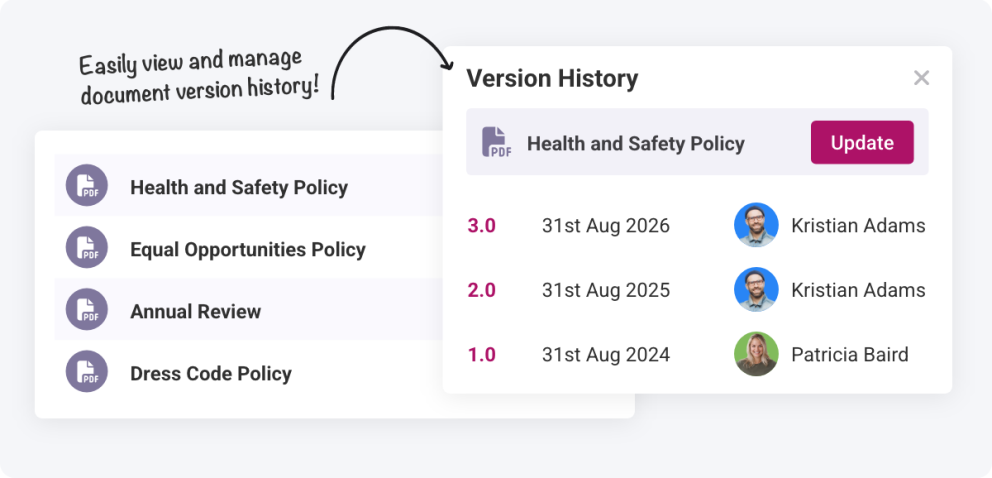
Uploading a new copy of a document now automatically creates a new version, giving you a clear and reliable version history. Older versions remain linked, making it easy to review how a document has changed over time and see exactly who viewed or accepted each version. This added visibility strengthens compliance and makes important information agreement traceable across your team.
Leave Balances Report
The report suite has a new member: the Leave Balances report. It lets you assess employee leave hours across their holiday year for each leave type. You can see their starting allowance, any adjustments and the remaining allowance for the year, helping you to spot who might be running low and at risk of burnout, and who might need to pick up a few more hours.
Average Weekly Hours Report
The Average Weekly Hours report gives you a clear overview of how employees are scheduled and how much they actually work across any date range you choose. By comparing average scheduled, worked, and overtime hours, you can quickly spot whether team members are consistently under‑ or over‑scheduled and make adjustments before issues build up. Whether you’re reviewing the last quarter or a six‑month period, this report helps you balance schedules more efficiently and maintain healthier staffing workloads.
Document Acceptance
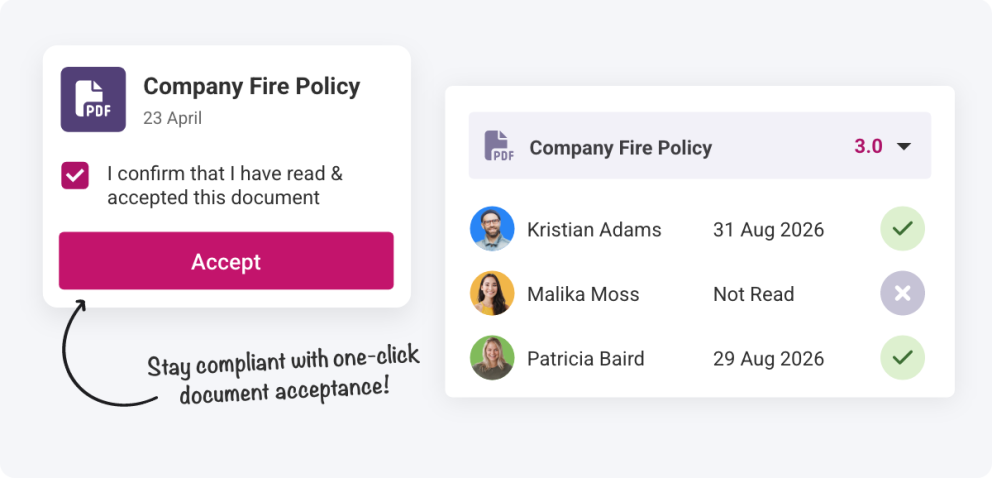
Requiring employees to formally accept documents gives you stronger confirmation that key policies and information have been understood. With this new feature, you can request a formal acceptance rather than relying solely on a read receipt, ensuring staff actively acknowledge important updates or compliance‑related documents. It’s a simple way to increase clarity, accountability, and confidence across your organisation.
August 2026 Product Updates
Last updated: 26th August, 2026Custom Pay Permissions
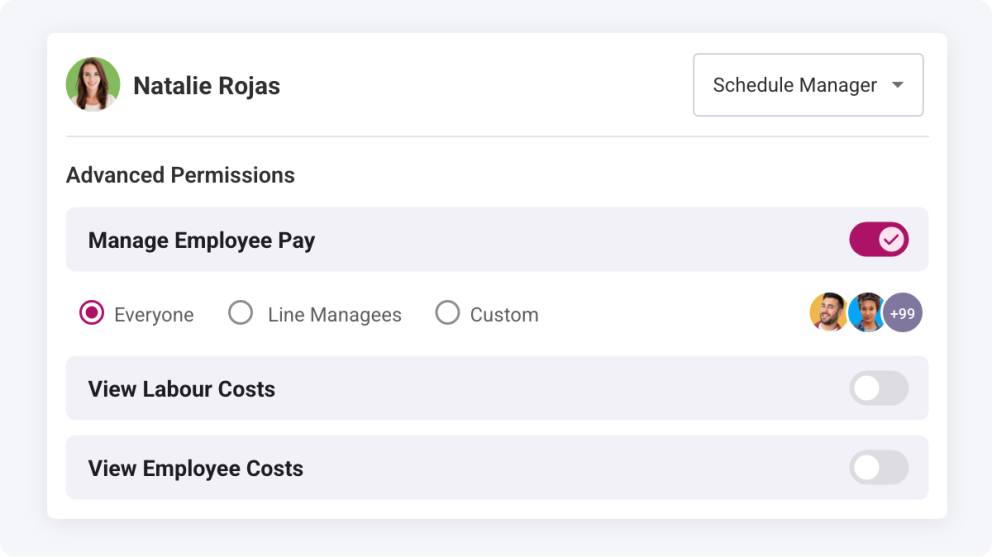
Permission levels for management staff are now more flexible. You can specify exactly which employees a manager can view pay rates and shift costs for, ensuring sensitive information is only shared where appropriate. This gives you tighter control over confidentiality and removes the worry of exposing data managers don’t need to see.
Optionally Reinvite when Reinstating Employees
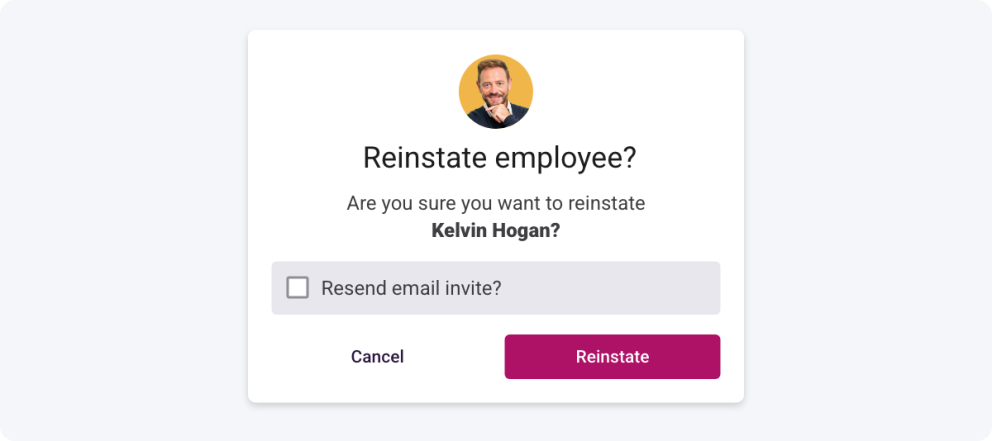
After archiving employees for the off‑season and reinstating them for the next, you can choose to send their invites right away or update their accounts first before inviting them back. This gives you more control over onboarding and ensures everything is set up correctly for the season, saving you from those “Can you update my details?” messages.
Document Expiry Dates
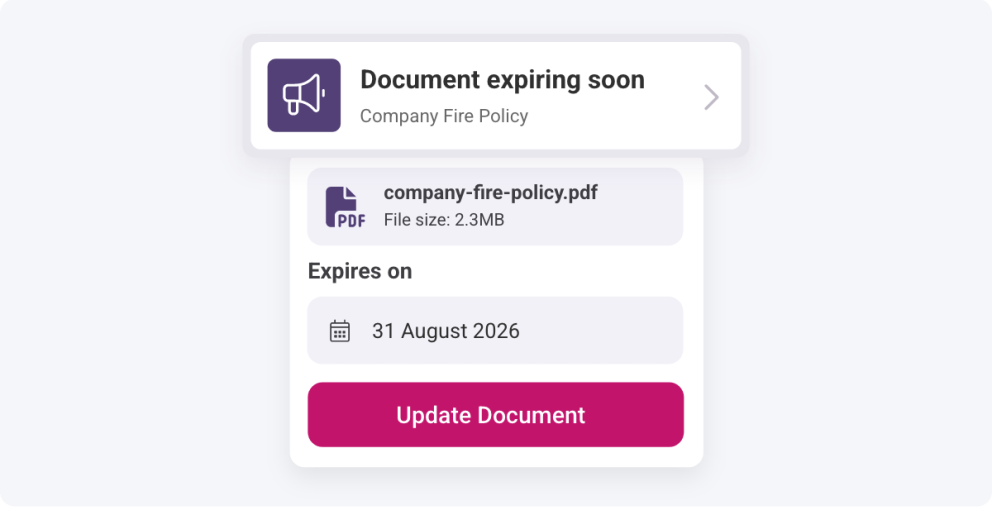
Documents can now have expiry dates, helping you stay compliant and ensuring employees always hold valid documentation for HR requirements. You’ll also receive notifications when a document is close to expiring, so you never miss an upcoming renewal and your teams remain fully prepared for duty.
July 2026 Product Updates
Last updated: 27th July, 2026Bradford Factor Report
Our new customisable report for reviewing employee absence Bradford Factor scores allows managers to check each employee’s score across a chosen date range for selected absence types. This provides a single, reliable point of reference, making it much easier to track employee absences and identify patterns that may need attention.
June 2026 Product Updates
Last updated: 23rd June, 2026End Employee Breaks from Time Clock
We’ve expanded the Time Clock tools to make life a little easier. Alongside setting custom clock‑in and clock‑out times, managers can now end an employee’s break with a chosen time right from the Time Clock page. So if someone forgets to clock back in but you see them working, you can update their return time on the spot, no need to remember to fix their timesheet entry later.
Unscheduled Timesheet Rounding
Unscheduled timesheet entries can now be automatically rounded using your timesheet rounding rules. When an employee clocks in without a scheduled shift, their time entry will be automatically rounded according to your existing settings, helping you to keep payroll consistent and accurate.
May 2026 Product Updates
Last updated: 11th May, 2026Schedule Job Role View
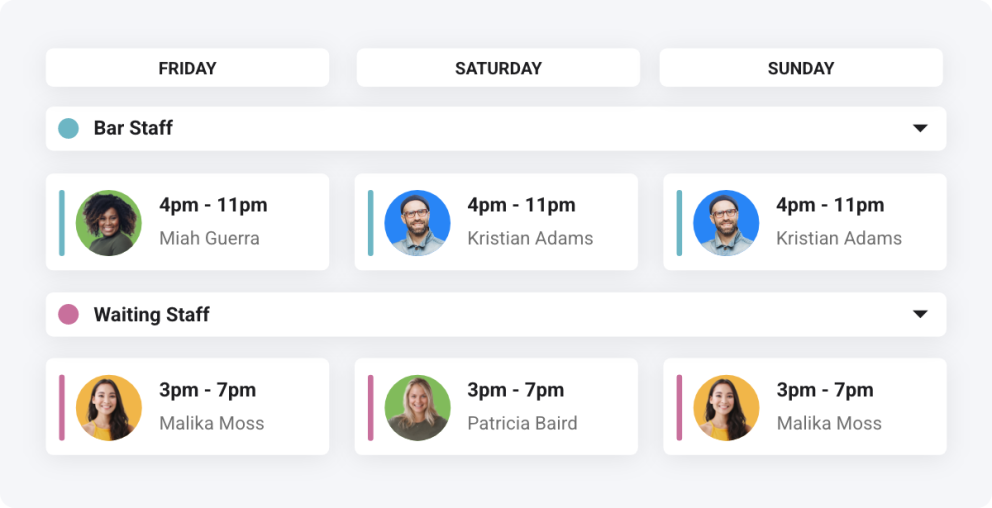
Shiftie’s new schedule layout helps you easily view the allocation of job roles across your weekly shifts. This helps ensure that all positions are fulfilled each day and reduces the need for searching each employee to check which role they’re working. With tools for adding new shifts, easily reallocating with drag-and-drop, and quickly viewing who’s on leave, this new view is sure to keep your scheduling simple! Read more about managing job roles here.
April 2026 Product Updates
Last updated: 22nd April, 2026Absences in Timesheets
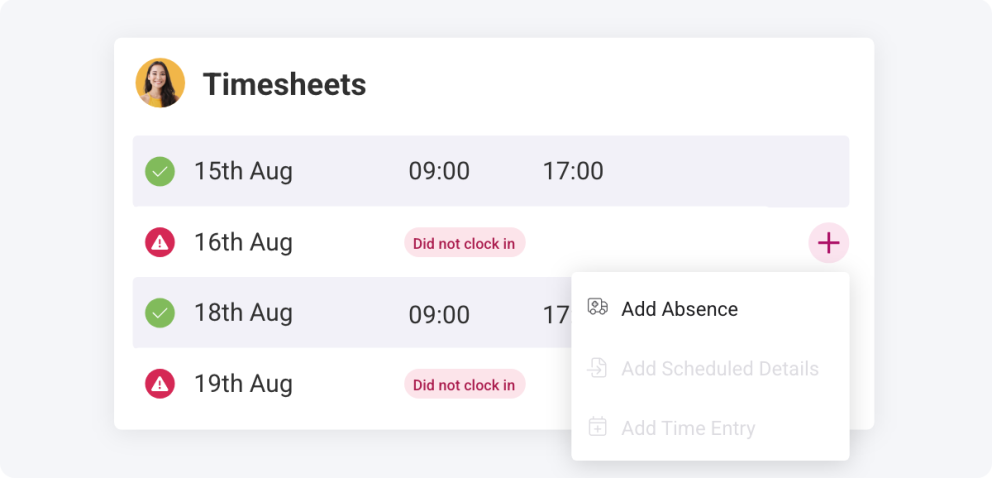
No more timesheets stuck with the “dreaded red dot”. You can now mark employees as absent to confirm missing timesheets and specify whether absences are paid. Absences can also be recorded directly from Time Clock, helping you manage each day as it happens and export everything in your pay reports, ready for payroll.
Direct Debit Payments
We’ve added a new way to subscribe to Shiftie. You can now pay via direct debit as well as card, offering a hassle‑free alternative to card payments and eliminating the need to constantly update card details. Just set it up once, and you’re good to go.
March 2026 Product Updates
Last updated: 31st March, 2026View Historic Pay Rates for Employees
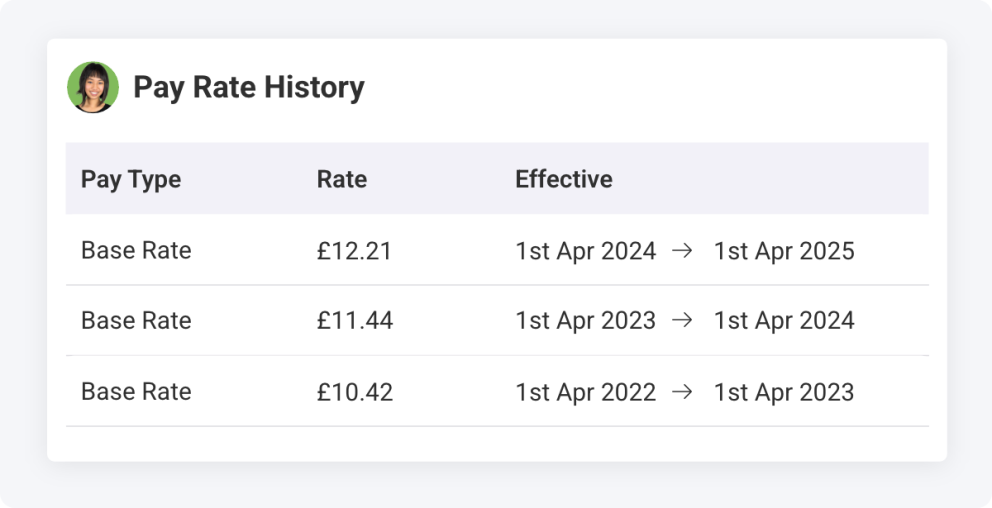
You can now access an employee’s full history of pay rates directly within Shiftie. This update makes it easier to audit payroll for previous months and verify what rates were in place before any changes occurred.
February 2026 Product Updates
Last updated: 17th February, 2026French Translations
As part of our ongoing efforts to grow Shiftie and continue building an innovative scheduling system for everyone, we’ve introduced French as a company-wide language setting. This is one of many languages we plan to add to Shiftie over time. If you’d like to see your native language supported, please get in touch.
January 2026 Product Updates
Last updated: 20th January, 2026ICRTouch Integration
We’ve integrated with ICRTouch! Seamlessly connect your sales data to Shiftie and compare labour costs with your income. Sales data displays directly on your schedule to support smarter shift scheduling and in reports for clear historical cost comparisons.
Read more about connecting your account here.
Link Unscheduled Timesheets to Shifts
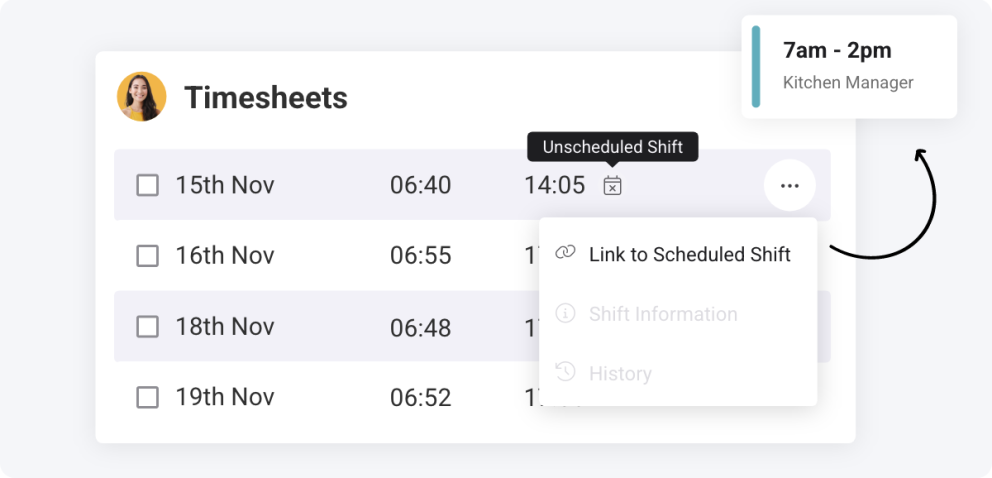
Have employees accidentally logged unscheduled timesheet entries? This new action lets you connect them to the correct shift, letting you compare scheduled entries against the actual worked hours, and round the timesheet as needed.
Leave by Employee Report
Ensuring employees are using their allocated leave is a simple but effective way to support wellbeing. We’ve added a new leave report to Shiftie that brings together every employee’s leave requests within a selected date range, making analysis quicker and clearer. You can now easily spot who may need more rest and who’s already striking a healthy balance.
Set Start and End Times when Clocking Employees In and Out
Tired of having to go back and set the correct timesheet clock-in time for employees you’ve manually clocked in? With this enhancement, it’s quicker to set the time straight from the clock-in, reducing effort and saving time for more important tasks.
December 2025 Product Updates
Last updated: 12th December, 2025InfoVetted Integration
By combining Shiftie’s smart scheduling software and workforce‑management tools with InfoVetted’s fast, compliant screening services, this integration adds a powerful layer to your people‑management workflow. For teams handling hiring, onboarding, and shift coordination, the result is a smoother, safer, and more connected experience. Read more here.
