
Scheduling
August 2026 Product Updates
Last updated: 17th August, 2026Schedule Filters
Improved schedule filters give you a tidier, more focused view of your scheduling, making hours and cost analysis easier to interpret and shift management simpler to navigate. Filters now hide shifts directly on the schedule, giving you a more accurate picture of what’s included in your results. Plus, with a new option to show or hide shifts from other schedules, you’ll have a cleaner, more reliable view when assessing fulfilment and coverage.
July 2026 Product Updates
Last updated: 15th July, 2026Clearer Shift Conflict Warnings
When adding a shift, the warning message now identifies which existing shifts would cause conflicts. This gives schedulers the details they need to understand potential clashes before assigning new shifts. With that context, it’s much simpler to resolve conflicts and keep the schedule running smoothly.
June 2026 Product Updates
Last updated: 15th June, 2026Acknowledge Shifts Details
The acknowledge‑shifts dialog now provides more detail about an employee’s upcoming shifts, including notes and tags. This gives team members a clearer understanding of any messages or responsibilities linked to their shifts before they acknowledge them, supporting smoother communication and fewer missed details.
May 2026 Product Updates
Last updated: 11th May, 2026Schedule Job Role View
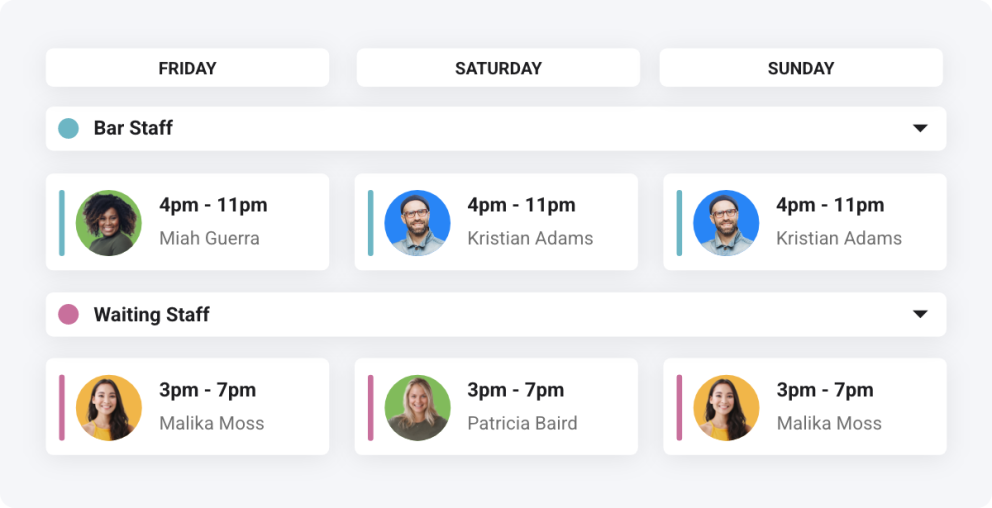
Shiftie’s new schedule layout helps you easily view the allocation of job roles across your weekly shifts. This helps ensure that all positions are fulfilled each day and reduces the need for searching each employee to check which role they’re working. With tools for adding new shifts, easily reallocating with drag-and-drop, and quickly viewing who’s on leave, this new view is sure to keep your scheduling simple! Read more about managing job roles here.
April 2026 Product Updates
Last updated: 14th April, 2026Improved Open Shift Review Flow
Reviewing open shifts just became more streamlined! A new status for open shift requests now makes it easier to see which employees are still available and best suited for the shifts they’ve claimed. Plus, any open shifts without available responses will be automatically hidden from the Requests page, keeping things cleaner and easier to manage.
March 2026 Product Updates
Last updated: 12th March, 2026Schedule Overview Widget Improvements
What’s a Dashboard without powerful tools? Just another filler page. At Shiftie, we take pride in providing great user experiences. That’s why we’ve enhanced the Schedule Overview widget to make adjusting shifts faster and keeping on top of actions easier. The widget now remembers the schedule you last selected and includes new viewing options, allowing you to switch between weekly and daily views seamlessly.
Even better, shifts can now be managed directly from the Dashboard; there’s no need to navigate back and forth to the full schedule. It’s all designed to save you time and reduce friction when managing your schedule.
December 2025 Product Updates
Last updated: 11th December, 2025Print Unavailability on the Schedule
The printed schedule now includes employee unavailability, making it easier to share complete, up-to-date information with other teams. This added visibility helps improve awareness, reduce clashes, and support better day-to-day planning.
November 2025 Product Updates
Last updated: 24th November, 2025Add Employees to Schedules Improvements
Adding new team members to your schedules just got even easier. You can now quickly select them directly from their groups, speeding up the scheduling process and reducing the chance of missing anyone.
Enlarge employee avatars on the schedule
Managing a large team and struggling to keep track of everyone? You can now enlarge employee avatars directly on the schedule, making it easier to quickly identify each team member and assign them to the right shifts with confidence.
October 2025 Product Updates
Last updated: 29th October, 2025Allocate Breaks During Shift Area Sessions
Breaks without a set start time can now be scheduled over a shift area session, allowing employees to take their breaks at the best time within their working hours. This gives teams greater autonomy while keeping overall shift timelines clear and organised. Prefer more structure? You can still assign specific break start times whenever needed.
Shift Overtime Warning Improvements
Keeping track of when employees are exceeding their contracted hours is key to maintaining balance and compliance. Previously, this information was always visible, which could feel a little cluttered. Now, we’ve refined the experience, and these details appear only when you set shift times that would push an employee beyond their contracted hours. It’s a cleaner, smarter way to stay informed without unnecessary distraction.
Open Shift Approval Adjustments
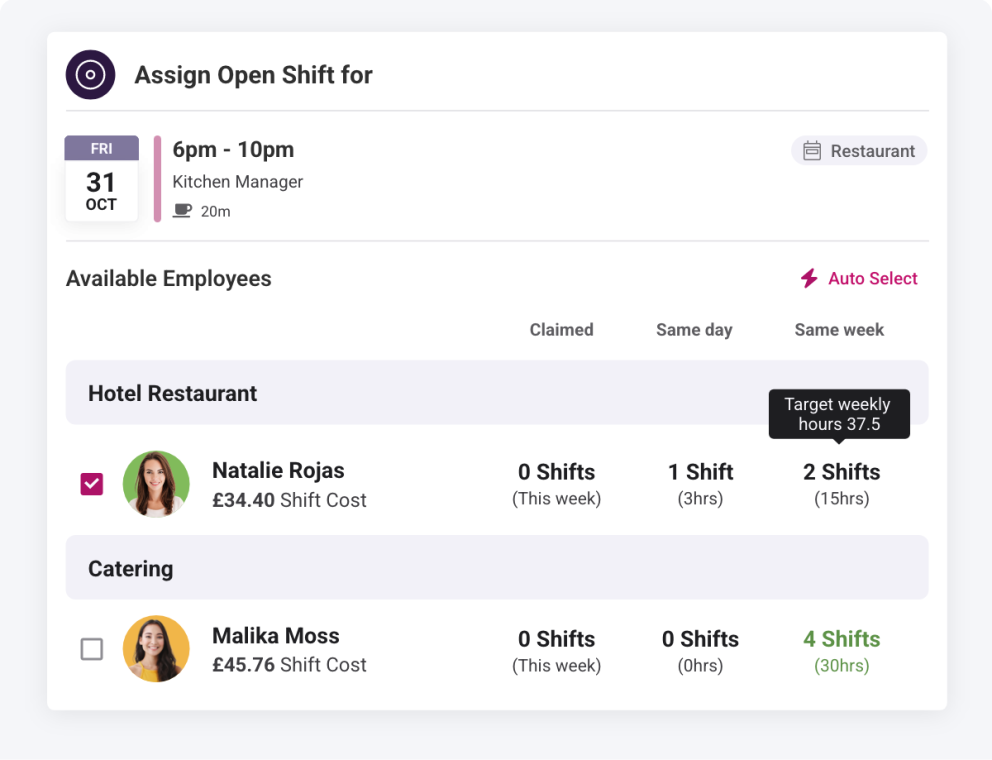
Approving open shift requests is now quicker and easier. With additional information visible when approving, including the schedule and employee group, it’s easy to find the most suitable employee for the shift! Not simple enough for you? Instead, let Shiftie automatically approve shift assignments using intelligent selection, choosing the most suitable employees from the list.
September 2025 Product Updates
Last updated: 24th September, 2025Schedule Bulk Updates
Say goodbye to the stress of last-minute schedule changes! With Shiftie’s schedule bulk updates feature, you can easily select multiple shifts at once and apply updates across all of them in a single action. Whether you need to adjust times, tags, or notes, this feature streamlines the process, saving you valuable time and reducing the risk of errors. Keep your team on track effortlessly while maintaining a clear, accurate schedule, even when plans change at the last minute.
Include Paid Breaks in Schedule Insights
Schedule insights now include paid breaks, both in the footer and for each employee, giving you a complete view of paid hours and costs. With greater accuracy, you can budget smarter and plan with confidence.
Additional Schedule View Options
Two new schedule view options make it easier to focus on the details that matter the most. Tags can now be displayed in full, shown in a condensed view, or hidden entirely to save space. You also have the option to hide location information on shifts, giving a cleaner schedule and more room for the details you really need.
Schedule Shift Panel Improvements
The improved shift panels now give you even more visibility, showing details like break duration and open shift responses so you can track and manage shifts easily at a glance.
August 2025 Product Updates
Last updated: 19th August, 2025Schedule Month View
Tired of scrolling through multiple weeks to ensure the month is covered? Schedule Month View is here to help give you a wider view of your schedules. You can now view all shifts across each month and quickly make changes where needed. Time off will also be visible in the new view, and bulk actions will work across the full month, allowing you to quickly manage more shifts at once.
Schedule Performance Enhancement
When you need to make quick adjustments to the schedule, every second counts and waiting for it to load is the last thing you want. Thanks to our latest performance enhancements, the schedule now runs faster than ever, letting you glide through shift changes, respond to requests in record time, and keep your team covered without breaking stride.
July 2025 Product Updates
Last updated: 3rd July, 2025Review Shift Swaps from the Schedule
A new tool has been added to the schedule to let managers approve shift swaps directly from the schedule, instead of visiting our dedicated requests page. This saves time navigating between pages as everything you need to manage the schedule is right at your fingertips.
June 2025 Product Updates
Last updated: 9th June, 2025Daily Time Off Events on the Schedule
Leave and unavailability events used to cover multiple days on the schedule; these have now been broken into events for each day for easier management and understanding of time used per day, allowing more awareness of shift availability.
