
Time Clock
June 2026 Product Updates
Last updated: 23rd June, 2026End Employee Breaks from Time Clock
We’ve expanded the Time Clock tools to make life a little easier. Alongside setting custom clock‑in and clock‑out times, managers can now end an employee’s break with a chosen time right from the Time Clock page. So if someone forgets to clock back in but you see them working, you can update their return time on the spot, no need to remember to fix their timesheet entry later.
April 2026 Product Updates
Last updated: 23rd April, 2026Allow Employees to Set Up Portals
We’ve introduced a new access role that lets employees sign in to and set up Clock In Portals themselves. That means less morning admin for managers and fewer interruptions during the day if the system logs out. If you’d like this switched on for your company, just reach out to our support team.
January 2026 Product Updates
Last updated: 5th January, 2026Set Start and End Times when Clocking Employees In and Out
Tired of having to go back and set the correct timesheet clock-in time for employees you’ve manually clocked in? With this enhancement, it’s quicker to set the time straight from the clock-in, reducing effort and saving time for more important tasks.
Clocking Outside Location Radius
Shiftie now gives you the option to allow staff to clock in from outside the GPS restriction radius for your locations. This enables employees to clock in when the signal is poor. Any discrepancies will be logged on Timesheets so you can easily manage employees potentially abusing this feature.
October 2024 Product Updates
Last updated: 28th October, 2024Clocking Notes on Portals
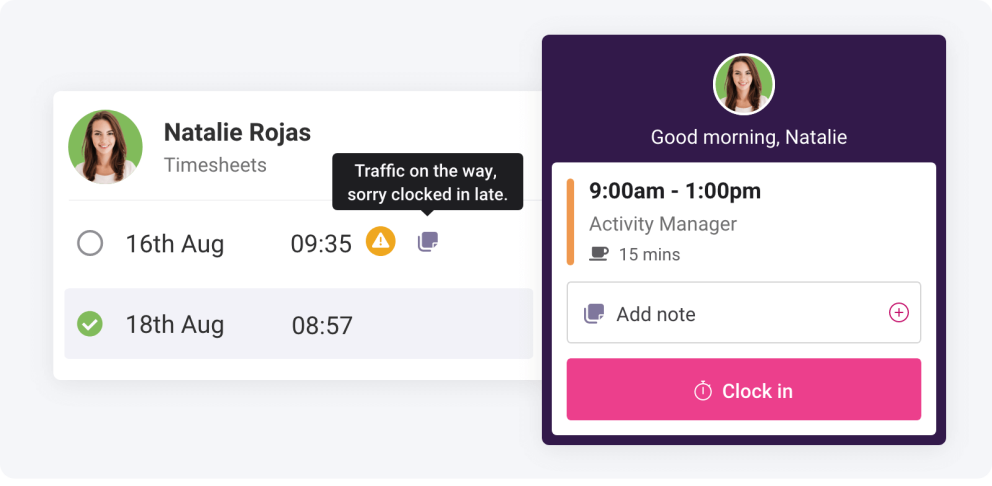
Employees can now easily add a note to a timesheet entry when they clock in or out using a Portal. Notes help timesheet managers understand discrepancies in the scheduled versus worked hours so they can quickly approve and export for payroll.
Clocking Notes
Employees can now easily add a note or message to a timesheet entry when they clock in or out of their shift as well as when taking breaks. Notes help timesheet managers to understand discrepancies in the scheduled versus worked hours so they can quickly approve and export for payroll.
September 2024 Product Updates
Last updated: 16th September, 2024Mandatory Auto Clock Out After 12 Hours
All scheduled staff are now clocked out automatically at most 12 hours after their shift ends. Ensure your timesheets don’t over-extend into overtime hours and exhaust your timesheet approval processes. Automatically clocked-out shifts are highlighted in timesheets for awareness.
May 2024 Product Updates
Last updated: 13th May, 2024Include all entries in the Time Clock Export
Previously only “Working” timesheet entries would be exported to CSV but we’ve listened to your feedback and adjusted to your requirements. Now the Time Clock Export will include all “Due In”, “Working” and “Finished” shifts and timesheet entries to make this a more useful tool for running attendance registers or dealing with emergencies such as fire drills.
March 2024 Product Updates
Last updated: 11th March, 2024Time Clock Settings per Location
Manage Time Clock settings for different locations, controlling whether employees can clock in on their personal devices, Clock In Portals, or both.
December 2023 Product Updates
Last updated: 21st December, 2023Introducing Our Clock In Portal
Your team can now clock in and out via designated portals on site, instead of having to use their phones. This is designed to make Shiftie more accessible, as well as helping to prevent employees from forgetting to clock in.
To find out more, or to get a new portal set up, check out our handy user guides.
October 2023 Product Updates
Last updated: 1st October, 2023Auto Clock Out For Unscheduled Shifts
Fed up of unscheduled shifts running on for days or weeks when your team forget to clock out of them? Us too; that's why we've introduced a new auto-clock-out setting. Going forward, unscheduled shifts will automatically end after 12 hours if they aren't stopped before, with the timesheet defaulting back to a 1-hour shift, ready for you to edit as required.
August 2023 Product Updates
Last updated: 1st August, 2023GPS Restriction on Clock Out
Any location restrictions you’ve set for clocking in will now apply when your team clock out, too. This helps to prevent employees from clocking out when they’ve already left the site.
Break Start Time on Time Clock
When viewing the time clock overview you’ll now be able to see when your team members went on break, and how long they’re expected to be gone for. Much better when you're waiting for an employee to return before you can take your own break!
June 2023 Product Updates
Last updated: 1st June, 2023Time Clock Overrides
Managers can clock employees in and out of their scheduled shifts from the time clock page, making it easier to keep timesheets up to date.
Learn more